This product is transferred. If you delete it, you will no longer be able to buy it with a 100% discount for the initial order. Would you still like to proceed?
Offer shoppers a professional approach by showing highly detailed product info. Provide accurate manuals, licenses, warranties and other info on webstore pages. Upload files of any format to Magento and use catchy icons to capture customers' attention with Magento 2 Product Attachments.
If you sell complex products or just want to outplay the competitors, you need to provide shoppers with a maximally detailed description to bring them closer to a purchase. They may need warranties, user manuals and visual instructions, as plain text is not enough in some cases. But vanilla Magento has no options to attach files to products, and shoppers can’t be sure that particular items are suitable for them and better than other stores offer.
💫Solution
The Product Attachments extension for Magento 2 equips store pages with a special attachments block where you can upload documents such as user guides, certificates, licenses and others to show your customer-centric approach. Attach the same document to multiple products, categories and CMS pages. Use custom icons and adjust the display to make pages as informative as possible.
See how our clients use product attachments in their stores
What are the goals of the solution?
💰
Boost conversions: introduce useful data to show that your products are reliable
👏
Highlight individual approach: create highly-targeted files with custom titles and limited visibility
💯
Show professionalism: provide supportive post-sale info in emails and customer accounts
Equip your store with all types of attachments
The product attachments extension for Magento 2 creates an attachment tab on your product page and/or a separate file download page that displays all the files you have attached to the product. The extension supports pdf, txt, docs, ppt, xls, zip, rar, mp3, mp4, jpg, jpeg, png, gif and other file types. This extension offers 3 main types of attachments:
File: Upload files of diiferent formats
Link: Attach links for file downloading
Page: Attach web page links (for PRO only)
Upload as many additional files as you need. Product Attachments for Magento 2 supports over 25 formats to help you share product info with users (File, Link types). Attach the same attachments to product, category or CMS pages and avoid database overload.
Display exhaustive product info
Сonvince customers that you are not just a retail store, but a whole service with ultimate pre-sale and post-sale support. Show specific attachments on any store pages to provide users with all the info they need for a purchase. Then, to retain shoppers, add after-sale documentation to customer accounts and transactional emails. Attach special docs to CMS pages to supply the store with useful info concerning your service and general policy.
Product Page
Category Page
CMS Page
Customer Account
Transactional emails
Product Page
Add PDFs and other docs to Magento 2 product pages and provide shoppers with extra details in one place. Adjust the attachments tab title and position among the other item details tabs to make files more noticeable for the audience.
Category Page
Place attachments on category pages via widgets. You may attach not only warranties and manuals but also use annexes for marketing purposes, e.g. add a presentation of special offers or new collections. Automatically synchronize all category brochures and promo flyers with all items of this category if needed.
CMS Page
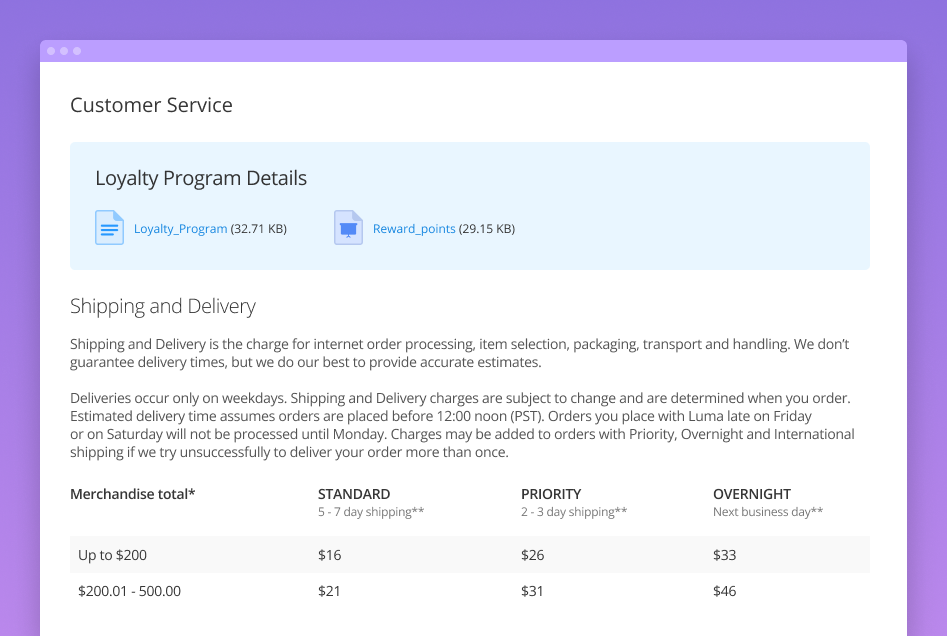
Use the widget to display downloadable information on CMS pages. It is useful when you have special offers and programs that are not connected with particular goods. Attach loyalty program details, privacy policies and other documentation to build the base of regular customers.
Customer Account
Show files in customer accounts to prevent shoppers from losing important documentation regarding the purchased items and their usage. Users can just open the necessary order in the ‘My Orders’ tab and find corresponding docs. Moreover, it is possible to display warranties or user manuals only for ‘Complete’ orders.
Transactional emails
Improve user experience and retention rate by adding valuable info to transactional emails. For example, attach PDF product manuals to Magento 2 emails to let them conveniently download necessary docs.
Create highly-targeted attachments
Adjust the attachments display to catch customers’ attention and motivate them for downloading:
Customize icons - use predefined icons or upload your own ones
Adjust the labels - encourage shoppers to download a file by choosing a catchy title
Show or hide the size - improve trustworthiness by making sizes visible to shoppers
Also, you can show specific docs to particular customer groups and make your selling strategy individual.
The extension is compatible with the Magento Enterprise Remote Storage functionality.
Manage files & optimize performance
Magento 2 File Attachments extension is highly-optimized for large stores. Add each file only once and sync it to as many products as you need, which doesn’t overload the database and is optimal for managing a great number of attachments. Automatically check all store attachments of 'link' and 'page' types to their availability and be sure they are active to visitors.
Manage attachments
Assign files to products
Attach docs to categories
Manage icons
Analyze reports
Manage attachments
The extension contains a separate grid, where you can view and adjust each attachment. Change the icon, title, visibility and include it in order if needed. Connect docs to multiple categories right from the edit page.
Assign files to products
Add one file to several items without assigning the copies to each particular one. This feature also saves your time and effort, as you can quickly update only one document. Add the existing docs or upload new files to the Magento 2 extension and configure the settings right on the product editing page.
Attach docs to categories
Save tons of time by equipping all goods in a category with the needed attachments. Just navigate to the category's configuration and attach as many files to all items within a category as you need.
Manage icons
The Magento 2 module for file attachment lets you upload as many icon images as you need and assign them to each specific type. If you don't want to add your own icon images, you can use the predefined ones. The extension offers 8 ready-made icons that you may assign to particular extensions.
Analyze reports
Generate reports for different store views to analyze attachment efficiency. Find out which files for which store views enjoy greater popularity and modify less popular ones according to customer needs.
Import attachments in bulk
Magento 2 Product Attachments extension includes the built-in import functionality that allows you to upload any number of files at once.
It means you can significantly speed up the fulfillment process with just 3 simple import steps:
Prepare attachments for import (start from the "New Import" button)
Choose the required store view
Configure the import settings
Thus, you save a lot of time and get ready-made attachments in a few minutes.
NEW: Import also attachments of Link and Page types
[PRO] Make presentation more structured and easy-to-manage
The Pro package includes a complex feature for file structuration and grouping. Attachments are displayed in the groups you’ve created, which makes the presentation structured and well-organized, especially if you add a lot of documents.
Show groups of files on store pages
Customize file categories
Simplify management with API support
Show groups of files on store pages
Split all the attachments between groups to improve usability and let shoppers find the required ones faster. The feature lets you create a compact visualization of all the materials since the files of each category are displayed in dropdowns. Also, you can provide shoppers with a greater variety of product information by using links to web pages (Youtube videos, blog atrticles) as attachments.
Customize file categories
You can create as many categories as you need. Divide files by any suitable criteria: kind of information included, purpose, language and so on. Customize category names and icons to make the structure intuitive. Create specific groups on a store view level if needed.
Simplify management with API support
For stores that need to manage hundreds of files, manual processing is not efficient. The Pro version of the solution includes API support – upload, update, delete and perform other actions with attachments much faster.
Choose your perfect solution
Upgrade product presentation to the optimal level
Product Attachments
$169
Show attachments on product, category and CMS pages
You can uload pdf for a Magento product with the help of Product Attachments extension:
Navigate to Catalog → Products → choose the needed product;
Expand the Product Attachments section;
Click on the Add New Files button to upload new pdf from the computer or click on the Add Existing Attachments button to add already created pdf attachment.
Magento 2 File Upload extension is an important tool which allows you to provide customers with all necessary information about the product. You can upload manuals, warranties and other documents with its help. It supports more than 25 file formats and optimized for mobile devices. According to the statistics, the extension can cover each business need in synergy with the following solution: magento 2 bulk change category, magento 2 improved layered navigation.
Are Amasty extensions compatible with all themes and extensions by other vendors?
Amasty extensions work with all plugins we issued and with most 3rd-party plugins. If you come across a Magento 2 compatibility issue with any third-party module, we’ll definitely try to help you.
If you face any technical issues, please create a ticket...
Will I get free support and updates?
Product updates for extensions purchased before Feb 1, 2022With the transition to product subscriptions, you will receive product updates for all extensions purchased before Feb 1, 2022 throughout the entire grace period — up to Aug 1, 2022. If you ...
Do you have the installation service?
Yes, you can use installation and configuration services that are available as the part of Pro and Premium add-ons for your product subscriptions.Please note that this installation service doesn’t include uninstallation. So, if you need to completely...
Can I request a free trial?
Amasty doesn’t provide any trials of Magento extensions.
There's one exception: Amasty extensions are provided for testing or demo purposes to our official Platinum Partners as a part of the “access to Amasty extensions for testing purposes with Composer...
Can I test an Amasty extension on a staging site before transferring it to a live one?
Yes, you can install any Amasty extension on a test site and configure all the settings there before doing it on your live store.
How can I get a refund?
Amasty offers to its Customers a thirty (30) day money-back guarantee for the Software. In case the acquired extension didn’t meet your expectations, our support team is always ready to help you. Fees for support subscriptions and any services provided...
How can I receive a discount?
We are now working at a loyalty program for our customers that is supposed to bring even greater benefits in the long term. While it’s not out yet, you can look through these Special Offers. New discounts and specials are added every month. To stay ...
How to update a Magento 2 Amasty extension?
To update a Magento 2 extension by manual upload:1. log in to the customer account;2. navigate to the Products tab, scroll to the packages section, and click the Download link next to the extension that should be updated;3. Important: If some extension...
If I need additional features to be added to an Amasty extension, how can I ask for it?
To leave your feature request, log in to your customer account and open the Products tab. Then, scroll down to the bottom of the page, and leave your feature request in the following form:
As soon as you send your request, it is considered by our ...
Magento 2 Amasty extensions installation
Each Amasty extension package is provided with the extension files, installation & setup guides, and a license agreement. Some extensions include import files examples as well. So how to install our Magento extension?
What is the plugin...
How can I prolong support?
If you have an active support service subscription, it grants you access to support services for all products purchased before Feb,1 as long as your subscription is active. Alternatively, support services are only available as the part of a product ...
Can I change the EE extension to CE for free?
Usually, no, you can’t exchange modules. Please, contact our support managers and they’ll consider your case individually.
→ Learn more about our special offers
How can I get a discount to re-purchase plugins?
Usually, we don’t provide any discounts. But you can contact us, and we’ll consider your case individually.
→ Learn more about our special offers
What is the license policy? On how many websites can I use Amasty extensions?
Our license allows you to use a single extension license agreement on one Magento installation.If you run several domains on the same instance of Magento, you can use one extension license. However, if you run each website on a new installation of Magento...
How can I pay for Amasty extensions?
You can pay for our extensions in any convenient for you way as a full range of payment methods are supported. The most common means are credit card or PayPal. Security and fraud protection are guaranteed.
If you need to pay for the order with a non...
Compatibility now the extension is compatible with Magento 2.4.7
3.2.0 - Mar 19, 2024
Improvement now it is possible to add Alt Tag to Product Attachments Icons
Fix we fixed the error that occurred when using Mass Attachment Import
Version 3.1.1
Last Update: Sep 08, 2023
3.1.1 - Sep 08, 2023
Fix we solved the issue with attachments displaying in emails for Bundle products
Fix we fixed the imported files counter work
3.1.0 - Aug 28, 2023
Compatibility we added compatibility with Hyvä Theme for Product Attachments. You can find packages for installing in composer suggest: 'amasty/module-product-attachment-hyva' for Lite version and additionally 'amasty/module-product-attachment-pro-hyva' for Pro version (Note: the compatibility is available as a part of an active product subscription or support subscription)
Version 3.0.0
Last Update: Jun 19, 2023
3.0.0 - Jun 19, 2023
Improvement now it is possible to add Link type attachments via Mass Import (Please note: after update the extension is backward incompatible so third party customizations for this functionality on your instance may be incompatible with the module)
Improvement now it is possible to add Page type attachments via Mass Import (available in the Pro Version of the Product Attachments Solution)
Improvement we added icon image for the Page type attachment (available in the Pro Version of the Product Attachments Solution)
Fix we fixed the problem with widget attachments displaying in the widget options while a new page is being created
Version 2.7.0
Last Update: Jan 17, 2023
2.7.0 - Jan 17, 2023
New now it is possible to automatically check Link and Page attachment types to their availability
Improvement new attachment type "Page" was added, so now it is possible to attach not only file links, but also web pages links (available in the Pro Version of the Product Attachments Solution)
Refactoring we added an extension point to the core module for better Pro features implementing
Fix the issue with an attachment adding while new category creation was resolved
Fix now Product Attachments are also duplicated when the 'Save & Duplicate' product action performing
Fix we fixed the error occurred while updating to the module latest version and setup:upgrade command running
Version 2.6.1
Last Update: Jun 01, 2022
2.6.1 - Jun 01, 2022
New for all Amasty solutions, we have compiled separate packages, each of which includes a unique set of extensions. So that you can more easily find all available updates for your package in the Change Log tab, please find the menu on the left and choose the extension(s) included in the package. (A list of extensions included in a package can be found under the Description tab)