


You can install extensions and updates via Composer
See Magento (and other software) versions we support and guarantee their compatibility with our extensions

Let your customers find the best products fast! Give them effective options for sorting - by bestsellers, biggest saving, etc. Add featured product blocks based on the sorting options for different categories.
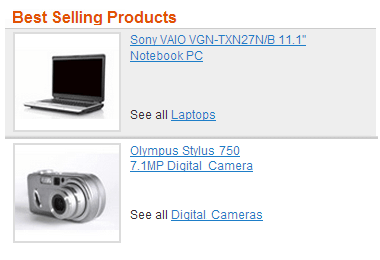
Looking for an easy-to-use tool to enhance customer shopping experience and increase your conversion rate? With the Improved Sorting extension customers will be able to easily sort products by various parameters according to their needs. The more user-friendly your site is – the more orders you get, everybody wins.
Although it’s difficult to predict which products will become bestselling, at the same time a few really popular items can generate the vast majority of store revenue. Then why not help your cash cows generate even more profit?
With the Improved Sorting extension bestselling and highly rated products will be automatically pushed to the top. Apart from that, you can manually manage the order of products for some options and create featured product blocks.
Each store highlights its bestselling products, as high sales demonstrate that a product is great. It also encourages customers to make their choice much faster. Thus, ‘Sort by popularity’ option will help to increase your conversion rate by drawing attention to any Magento bestseller you need. You can also specify the period, for which the sales are counted, for example last 100 days.
Even tempting deals won’t work for your business when customers can't find them. This magento product sorting option displays products based on the difference between regular price and special price. The bigger the difference - the higher the product is placed in the list. It will be very popular while holidays, as people are used to getting discounts during such periods. So, don't miss the chance to properly show your specials.
Sort products by the highest percentage of discount with the ‘Biggest Savings’ ranking option.
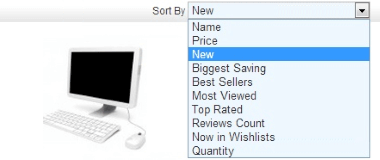
When customers click on the ‘Magento sort by newest’ option, new items are displayed at the top. And as soon as store visitors always tend to buy new products, this option will work for fashion stores, mobile phone stores and other sites of the kind, where people always look for new trendy things. You can use a custom date attribute to manage the order of products’ display for this option.

You can specify any preferred order for the sorting options in the Magento Sort by dropdown. Depending on the products assortment of your web store, you can set the most effective (or demanded in your opinion) sorting options to the top of the dropdown.
Specify the way the products should be sorted on the search result page and on the categoty pages. Set the priority for the sorting methods: specify the primal method and the following two algorithms. Have a full control on how to display the products in the most favored way for you.
When shopping, people are more likely to choose products with positive feedback from real customers than the products with just catchy banner adds. And, of course, there's nothing they will trust more than rating and reviews.
Many people buy things, which other people have or want to have. Also best-selling products may be difficult to get in holiday season. 'Now in Wishlists' will show products that are most frequent in wishlists - people will be afraid to miss the opportunity to get them and will place orders faster.
With a set of new sorting options admin users can display the most profitable (or the least profitable) products in sort results and featured blocks, thus effectively regulating sales of particular products.
Magento ‘Most viewed products’ option is a real must-have for new sites, which can’t boast of numerous orders. Views are generated much faster, so you can easily demonstrate the most popular products to customers and motivate them buy more. The ‘Most viewed products’ Magento feature also enables you to specify the period, during which the views are counted, for example last 100 days.
This type of Magento product sorting is useful for wholesalers, who buy products in large amounts. Now they can easily find out which items have the most stock.

Sorting works both for products from the catalog and key word searches as well as layered navigation pages and landing pages generated by Landing Pages extension.
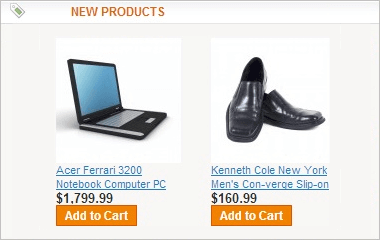
Create a sidebar block with Magento most viewed products or a top block with bestselling products and so on. Use templates provided by the extension or make your own ones.
Create featured product blocks of your Magento bestsellers, most popular products and other sorting types. Check out the extension demo for some examples of such blocks.
YAdd product blocks to any Magento page. In the blocks you can show products from the category they are displayed in or from any category you specify.
The extension automatically prioritizes products based on the sales amount or the number of views. If you want to manually move particular products up in the Magento bestsellers and most viewed lists to sell them quicker, this is also possible.
In Magento ‘sort by’ options have ascending order. It means that, for example, you can’t display most expensive items at the top. The extension enables you to sort magento products by price from high to low. This option is also applicable to other sorting types.
At the top of a product list it’s better to display items which you can sell right away. Customers will still be able to see and search for out of stock products. This feature has an effect only on catalog pages and can be disabled if necessary.
If you allow backorders, some products may have inventory status 'in stock', even if their quantity is zero. You can display such products at the end of the product list, when needed.
When you do a search in Magento store, the results are shown in ascending order of creation. This means that older products are shown first. Though for business it would be much better to emphasize best sellers or biggest savings. Now it is possible to set default sorting for search results page and for advanced search results page in just a click.

Make any of the new sorting options default both at the catalog and category level.
With the Magento category order feature you can change sort orders on a per-category basis and even change the default sort order per category.
You can disable any of the new sorting options both at the catalog and category level.
The indexing mechanism ensures your category pages are loaded fast even if you have a very large catalog.
Magento product order extension enables customers to apply all sorting options to product lists generated by layered navigation.
Sort order Magento tool supports MySql Fulltext search engine. Solr support will be added in the next versions.
With Search Pro extension you will significantly increase relevance of search results. Module allows to specify search priority for attributes, choose the search type (‘like’, ‘fulltext’ or ‘combined’) and provides you with highly-configurable autocomplete feature. Use Landing pages as a tool for quick and convenient creation of landing pages. The module lets you decide which content to display on the pages - selected products, banners, text info, CMS blocks. You can specify custom meta tags and short SEO url for each landing page.
You can also experience the power of 7 modules combined into one Improved Layered Navigation that lets shop by brands, filter out products with AJAX, have horizontal or vertical menu, use price sliders and numeric filters and more.
Also, if you want to optimize your product images without losses in quality try our Magento Image Compression tool.


Yes, the 'sort products by popularity' feature will help you make sales more efficient, as you can bring to the top any product you need despite its actual data. Go on reading to see more details.
Yes, the extension allows you to set any sorting option as default, you may sort products by newest or best sellers by default. To see the configuration follow the link below.
Yes, with the category order feature you can change the default sort order per category. Thus, any category you need can be assigned a category sort by best seller, new, most viewed, etc. Read on to get complete instructions.
Improved Sorting module supports all types of products. Read on to learn all the nuances.
Drop us a line and we'll customize this extension for you!
You can install extensions and updates via Composer
See Magento (and other software) versions we support and guarantee their compatibility with our extensions

Login and Registration Form