Improved Navigation
Make your website easy to navigate with AJAX filtering, checkboxes, shop by brands, attribute landing pages and other improvements. Get more orders!
|
Enterprise Edition
Compatibility: 1.8.x, 1.9.x, 1.10.x, 1.11.x, 1.12.x
![]() Price: $249
|
Community Edition
Compatibility: 1.3.x, 1.4.x, 1.5.x, 1.6.x, 1.7.x
![]() Price: $99
|
Screenshots
Extension Features
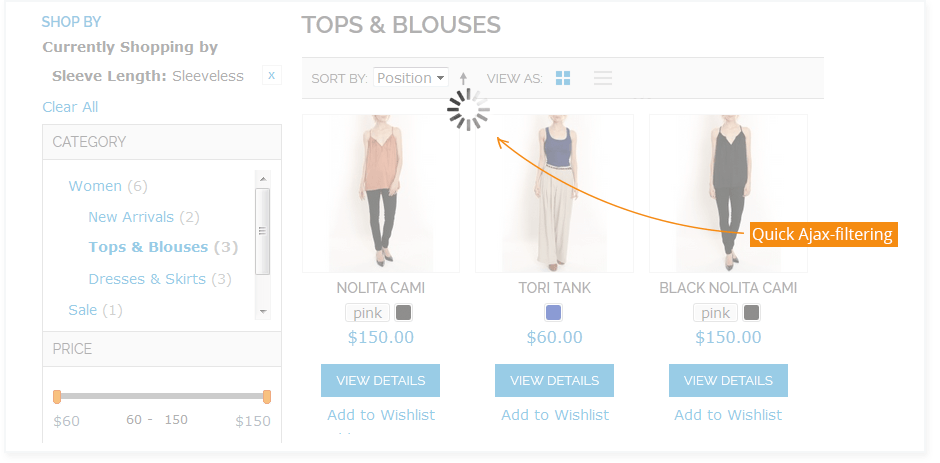
AJAX-based navigation. NEW!
The page will not reload each time a customer makes a choice in the navigation block, the product selection will be updated seamlessly. At the same time the extension feeds SEO-friendly urls to web-spiders and bots even if you are using AJAX mode, which is very important for search engine ratings.
Use SEO-Friendly URLs and other SEO improvements
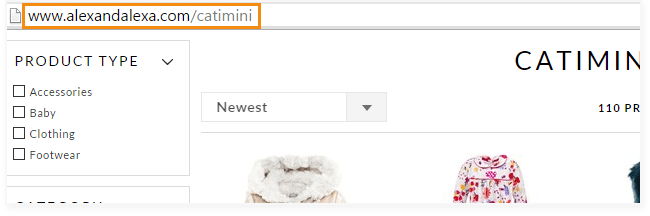
Now you can have nice-looking and search engine optimized urls like shopby/logitech.html or computers/shopby/logitech.html. You can choose canonical url structure, set 'noindex', 'nofollow' parameters for navigation pages and more.
Show layered navigation at home page for your customers to start browsing right from the moment they get to your site.
Also you can add the navigation to any cms page and to product pages, which will make browsing your store and finding products a lot easier for customers. See http://improved-navigation.amasty.com
Create manufacturer landing pages with logos, descriptions, layered navigation and meta tags.
Landing pages are a well-known marketing tool. With the extension you can optimize the brand description and meta tags for SEO and create attractive and easy to use pages with brand logos and left side navigation. Of course, you can also use HTML in the attribute descriptions to beautifully format them. See shopby/logitech.html
Customers can select multiple values for the same attribute with checkboxes.
For example they can search by red or pink t-shirt of M or L sizes simultaneously instead of only small red or only large pink – cool checkboxes make it easy to indicate choices.
If you need single select for some attributes - such option is also available.
This might be appropriate for attributes like 'Brands', when customers often want to see products of only one brand at a time.
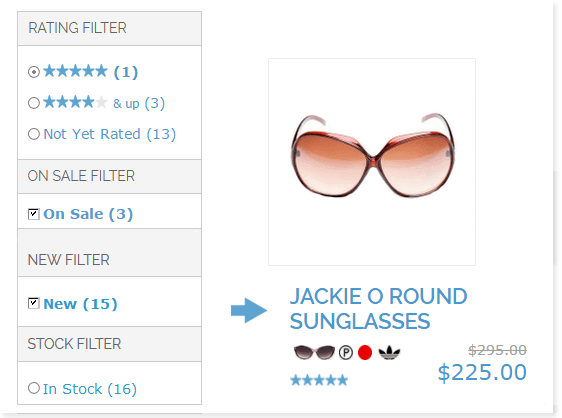
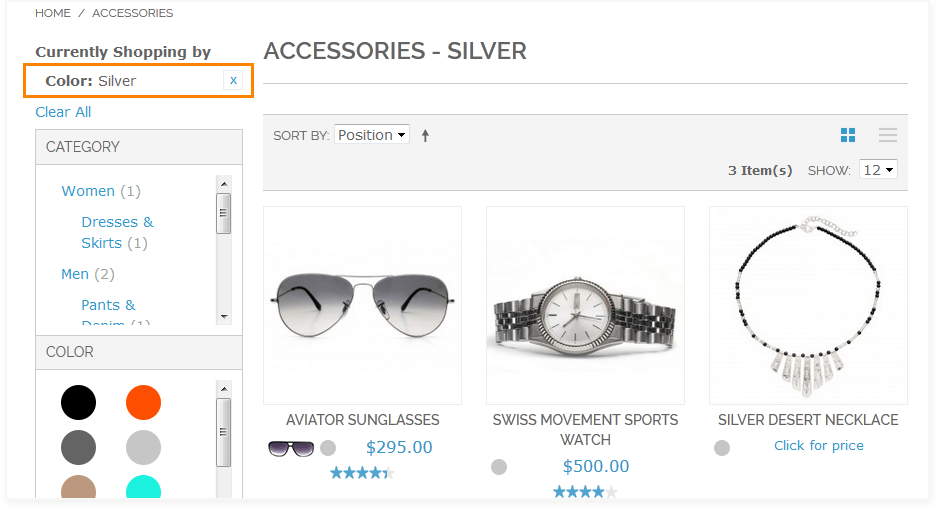
Create vivid and attractive layered navigation with images.
It’s a de-facto standard to show colored icons or brand logos in the navigation. You can also show glasses shape, wine type, textures and much more.
Full-featured attribute tool tips NEW!
To help customers with the navigation you can add a tool tip for each filter. Let's say you sell cameras and have 'Megapixel' filter. Some customers might be not aware of what it means. You can add a short explanation, let's say 'the higher the megapixel number - the better the quality of shots'. The tips are displayed only when customers hover mouse over the tool tip icon. You can use text, HTML or even images for tool tips to make them attractive and integrated with your store.
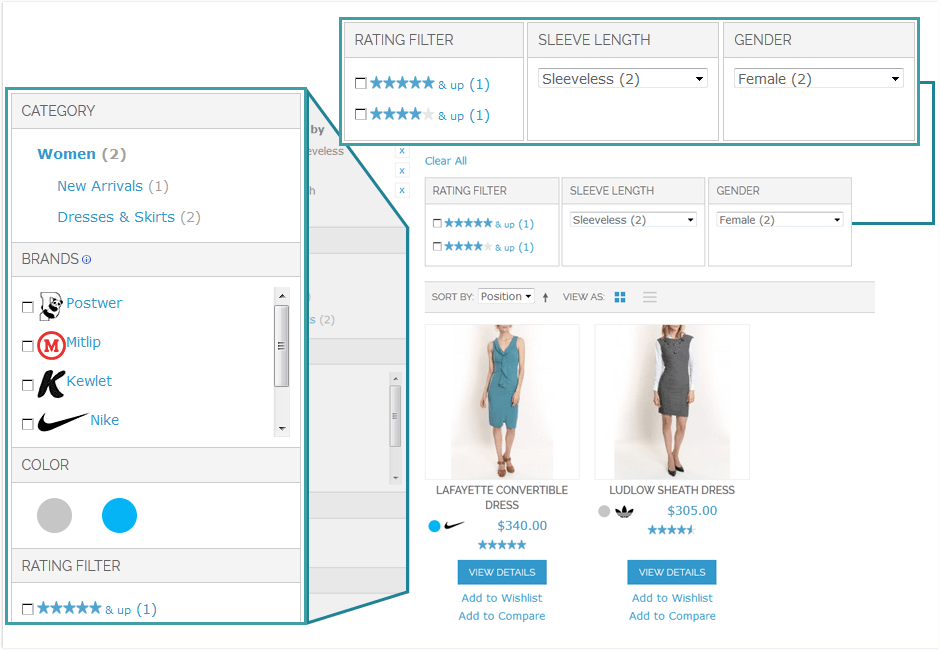
Vertical and horizontal navigation blocks NEW!
In some stores there are very many attributes in the navigation and the navigation block is very long. This is not user-friendly. With the module you can place part of the filters at the top of the middle column to solve the problem. This way your site navigation will be a lot more compact and usable.
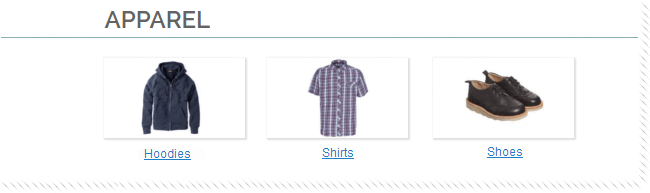
Show attribute icons with links on category (product list) pages.
This will help customers to recognize the products they are looking for a lot faster.
Get full control over the attributes positions, options sorting and folding.
- Sort attribute values by alphabet, position or products qty (for front end display)
- Provide customers with ability to fold and unfold attribute options. This feature is especially useful for websites with a lot of attributes and/or attributes with a lot of options. With it you can make your navigation more compact and easier to understand, because customers won’t have to scroll a lot down the page and won’t be confused by a very large number of options. However the most important will be available without additional clicks
- Choose which attributes to display at the home page. If you would like not to display some attributes in the home page navigation, just go to the extension settings page and list the ones that shouldn't be there.
- Exclude unnecessary attributes from category (product list) page navigation
- Make any of the filters folded (collapsed) by default, if needed. This feature enables you to attract customers' attention to the most important attributes and at the same time doesn't limit their choice. This makes your navigation more compact and usable.
Dependent Attributes NEW!
Have a lot of values in the left navigation (such as long models or years list)? Hide them untill a customer selects some values in the parent attribute. For example, you can choose 'Shoe size' filter to be displayed only when 'Versace' or 'Gucci' is selected in the 'Brands' filter.
Define your own precise price ranges for better segmentation.
Now you can set custom ranges for attribute ‘price’, e.g. 1-50, 51-200, 201-450, etc. See http://improved-navigation.amasty.com
Let customers filter products by their own price ranges with the help of 'From-To' widget
If a customer selects a predefined price range or specifies from-to conditions, the extension still shows the price filter for customers to be able to quickly modify their chioce. Also customers can specify top or bottom margin of the price range only. For example if a customer indicates only top price margin (e.g. 300), only products with price equal to or below 300 will be displayed. There's an option to hide price ranges and use only 'From-To' widget.
Create cross-links and show attribute images at the product page
Along with icons for layered navigation, you will also have an option to upload an attribute icon for product pages. The icons will link to the list of all products sharing this attribute option (e.g. some product quality, let’s say brand or color), this will create additional cross links, which will make it easier for customers to find similar or matching products and improve your site SEO. Moreover, easy to comprehend icons on product pages will help the customers to make a choice faster and better - http://improved-navigation.amasty.com/blackberry-8100-pearl.html
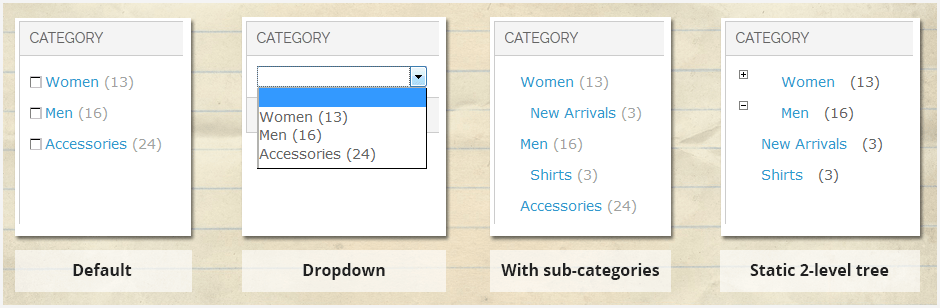
Four display options for 'Categories' attribute:
- Default - as in standard magento navigation.
- In dropdown.
- Together with sub-categories, to simplify customer's choice.
- Static 2-level category tree with plus/minus controls, works great for stores with 1-2 level catalog.
Create list of all brands in nice alphabetically ordered blocks
You can use this feature also for any other attribute and create list of all models, all available colors, all authors, etc. Such lists are a good addition to the product catalog, as many customers are looking for products of a specific brand, model, color, etc. See http://improved-navigation.amasty.com/brands
Choose attributes display modes
You can choose from several attribute display modes (images only, labels and images, dropdowns, etc), this way you can set an appropriate look for each attribute. See http://improved-navigation.amasty.com/computers.html. ‘Images Only’ mode works well for showing brand logos, ‘Dropdowns’ - for long options list. The ‘Dropdowns’ type is also available for Category and Price attributes.
Create "featured" blocks (featured brands, featured collections, etc).
You can create a "featured" block for any filterable attribute (e.g. brands, models, etc) and place it at any CMS page (several “featured” blocks can be used simultaneously). By clicking on a brand your visitors will see brand description with logo and the list of all the brand products. This feature is widely adopted by many e-commerce solutions. It is possible to limit the number of featured options (brands, models, etc) and show them in random order.
Hide out of stock items from the navigation.
There is a bug with Magento configurable products. If you enable display of ‘out of stock’ items, in the navigation customers see, say Medium (1). But when they open the product, medium size is unavailable in the dropdown. With the extension only available options will be shown in the navigation block. The feature is disabled by default, if you need it, please ask via email, it's a freebie (available for Magento 1.3.x versions only).
Ability to exclude categories from layered navigation.
If you would like not to display some categories in the layered navigation - feel free to do so by indicating their ids in the configuration section.
You can use CMS blocks for attribute option description.
This feature is very handy if you need to use magento variables for attribute options description. To utilize a CMS block you will need to just indicate the block identifier when configuring an attribute option.
Might be useful.
Improved Navigation is fully compatible with the popular Product Categories addon, which allows to show related categories right at the product page - great for cross-promotion.
Other extensions that improve customer experience at your store:
- Improved Sorting extension - provides a large number of product sorting options, for example sorting by biggest saving, top rating, new products and many others. Let your customers list products in the comfortable way - get more orders.
- Product Parts Finder extension - you can make it easy for customers to find spare parts and components - by adding year-make-model or similar filters to your store.
- Previous-Next Navigation extension - considerably improves navigation between products from categories and search results pages.
- Custom Stock Status extension - Magento includes out-of-stock items in the quantity displayed in navigation, so when customers open some page they see a lot fewer products than shown in quantity or no products at all! With Custom Stock Status you can assign a custom message to out-of-stock products like 'will be back on May 15'. So customers will be informed and will come back to your site for purchases.
Live Demo
Try home page navigation, view product page icons and shop by brands.
New: check out All Brands page
Important: supports Multi-Language set up. Live example http://www.getalamp.com.
Also the extension:
- Meets all Magento development practices.
- Has built-in installation check.
- Is 100% Open Source with no obfuscation or encoding.
- Is easy to install (takes just a few minutes).
Latest Reviews
- Kevin, PC-PartsExpress.com
Amasty's Improved Navigation is exactly what I needed for our site. We have many categories as well as the need to sort products by brand and model. Improved navigation gives us the ability to have these navigation options right on the homepage. This extension really helps capture the power of Magento's unlimited attributes ability. I'm extremely happy with this extension. It was easy to install and the support is excellent. All of my emails were responded to quickly and effectively. I recommend this extension to anyone who wants to try it. You won't be disappointed. - Sabina Andersen, www.fitnesszone.gr
Thank you for a super extension. It has basically solved more then 3 problems for my site. Later on I'll be voting and giving a review in the Magento site. Highest of course! - Iggy, www.ebdj.co.uk
This is possibly the best extension/module I've come across (and I've played with many). Works like a dream! If there was a negative thing to point out it would be the "user guide" is a little limited. - Flank Marketing, flankmarketing.com
We purchased this extension wanting to re-display the product attributes in a unique filterable way on the category view. This extension was produced with solid, bug-free code, and packaged with incredibly helpful support from the Amasty team.
We are glad that reviews are available so we can provide an honest, transparent customer review that directly relate to the quality support we received from the Amasty team.
They come highly recommended, and we're excited to vouch for their stability in providing you the same service we speak about.
Rock on. - LPL, F:A LPL
This was the fifth extension I bought from Amasty, and I almost can't belive the quality of the products that comes from this company. If I was impressed by the first extensions I bought, I don't even know how to grade the Improved Navigation... I'ts amazing. I had one small version-issue with one of the ext:s in the beginning so I had to try out the support. Same quality! After a few hours everything was up and running. Please keep up the good work. - C Thamer, PWB
I will give high marks Amasty just because of the great support. Any issue I have had has been promptly resolved. Amasty even improved the module based on my feature requests. I will not hesitate to do further business with this developer. - cestor, Magento Connect
I would definitely recommend this product, both because of the quality of it (does what it says on the tin) and the superb support. I had an issue with the installation over a weekend and by Monday morning, Amasty support had used a temporary login to diagnose and fix the problem. Great service! - Renaud Devaliere, Project manager
I used Improved Navigation for one of my client with where looking for creating menu with filter to be able to manage a big quantity of product.
I can said that, i am more than happy of this choice, the after sales service is fast and very helpful, i always get the new version on my email and the result is even better than i exempt because the team add the sep management.
Thanks again for this nice plugging
- Prulez, Magento Connect
This extension is ace. It does exactly as advertised, and if something breaks on your end, or doesn't work as expected, basically anything you need support for, you receive that support. This has to be, by far, the best support I've got from a developer, because I've had numerous times where the after sales were rubbish, but this is quite the opposite.
10/10. Excellent extension, and excellent support. Sometimes it's so great that I feel like I'm their only customer. - wojt, duomo.pl
This powerful solution and excellent support. It works just like I wanted - it's what I was looking for.
I recommend this extension - shop is running much better. Layered Navigation makes sense only with this extension. Good job, and thanks for your help. (I use this more than a year) - Simon Brandon, Fast Forward, http://www.ffwdwebsites.co.uk/
Great and essential extension (although I can't help but feel it should be in the Magento core!)
Even better than the extension itself is the support - first class, fast and helpful. Highly recommended! - Angelica Kolody Mammana, http://www.lanuance.com.br
Amasty's are the best extensions out there, that's why I keep buying them.
I have tried many extensions, from different developers, and yours are by far the most reliable, and your support also is very good. - Ian, http://www.electrical2go.co.uk
Simply Brilliant, I've used possibly every aspect of this module. Very Very easy to install, takes a little time to configure - but thats what you get for a professionally coded product. Very advanced filtering, everything all in one . . . Brilliant!
I think this was my first purchase from Amasty and I've purchased 8 more since, WHY? because they work and Amasty's support is second to none.
Keep up the great work guys, many thanks - Ian - Dave Scharf , dsdesign.ca
Thank you for your help, and such a great extension. It's been very easy to use and setup, and just works! - fka200 , Magento Connect
By far the BEST support and BEST Magento extensions company. Amasty is absolutely amazing. Improved Navigation is an extension that should be used by every Magento store... after installing it, I was able to rank in the search engines for my brand names which has brought in a lot of sales for me. Without it, I would not be anywhere near what I have accomplished. Literally THE BEST and most important investment I have made for my Magento store. Amasty is just the icing on top... the support, the friendliness... just wonderful :-). 5 STARS! - Valentin Ilas, Web developer
I must say, your extension is absolutely fantastic! it does everything!
Change Log
Version 2.0.1 - March 28, 2012
- New SEO feature - ability to specify meta tags and canonical url for any combination of filters.
- Japanese locale. Special thanks to Hirokazu Nishi for providing the translation.
Version 2.0.0 - March 1, 2012
- AJAX filtering on catalog, search, or home pages.
- SEO friendly urls for web-spiders and bots even if you are using AJAX mode.
- Vertical and horizontal navigation blocks, you can use one of them or split attributes between both.
- Full featured tool tips for the attributes in the navigation: use text, HTML or even images.
- Dependent filters.
- Ability to exclude some categories from the layered navigation.
- No need to add CSS manually.
- 404 for undefined options in SEO mode.
Version 1.4.6 - December 2, 2011
- New SEO options nofollow and noindex for filter pages.
- Flexible canonical urls for category pages.
- Optional rel="nofollow" parameter for navigation links
Version 1.4.5 - September 21, 2011
- Flexible canonical urls for shopby pages.
- Bugfix.
Version 1.4.1 - March 11, 2011
- Ability to use CMS blocks for attribute option description.
Version 1.4.0 - March 7, 2011
- Seo URLs. Now you can have nice-looking and search engine optimized urls like shopby/ecco.html or apparel/shopby/womens.html
- Single select for filters.
- Collapsible/Expandable filters. This feature enables you to attract customers' attention to the most important attributes and at the same time doesn't limit their choice. This makes your navigation more compact and usable.
- An option to hide price ranges and use only 'From-To' widget
- Ability to show categories together with sub-categories, to simplify customer's choice
- Ability to show static 2-level category tree with plus/minus controls, works great for stores with 1-2 level catalog.
- Now filter options can be folded and unfolded also with 'Images only' and 'Labels and Images' display types
- Compatibility with the latest version of Improved Sorting extension.
Version 1.2.8 - February 18, 2011
Features and enhancements:
- From-To price filter
- If a customer selects a predefined price range or specifies from-to conditions, the extension still shows the price filter for customers to be able to quickly modify their choice
- With the new From-To price filter customers can specify top or bottom margin of the price range only
- Java Script functions have been moved from HTML to a separate file to provide clean HTML
Fixes:
- Valid canonical url for the shopby/ page
- Proper meta tags at the the shopby/ page
Version 1.2.7 - February 9, 2011
- Show attribute icons with links on category (product list) pages
- Exclude unnecessary attributes from category (product list) page navigation
Version 1.2.6 - January 26, 2011
- Display of Category and Price options in a dropdown
Version 1.2.5 - December 19, 2010
- Custom price ranges - now you can define ranges for price attribute (e.g. 1-50, 50-120, 120-400, etc)
Version 1.2.4 - December 2, 2010
- Filter options can be folded and unfolded
- Fixed sorting for brands pages
- Display only "in stock" items in the layered navigation.
Version 1.2.2 - Semtember 25, 2010
- Limit the number of featured options (brands, models, etc) and show them in random order
- Create alphabetic list blocks (alphabetic list of all brands, all models, etc.)
- Choose which attributes to display at the home page
- Use HTML in the attribute descriptions
- Attribute values in urls are sorted alphabetically, which eliminates duplicate content (crucial for SEO)
- Fixed issue with urls for cases when magento is installed in a subfolder
Version 1.2.0 - August 17, 2010
- Improved layered navigation on the search results page
- Add navigation to any static page (not only home page)
- Display navigation at product pages
- Restyled multiple select - now with cool checkboxes
Version 1.1.0 - May 3, 2010
- Ability to select multiple values for the same filter (search by red AND pink color instead of only red OR only pink)
- SEO friendly category urls (furniture.html instead of index.php?cat=12)
Version 1.0.1 - March 5, 2010
- Compatibility with Magento 1.4